Instructions for 2 ways to change Facebook name when less than 60 days
Method 1: Change the language to English
Step 1: Log in to the Facebook account that needs to be renamed, if blocked, you can see the latest way to access Facebook at the content you shared before.
Step 2: Click on the arrow icon and select Settings.
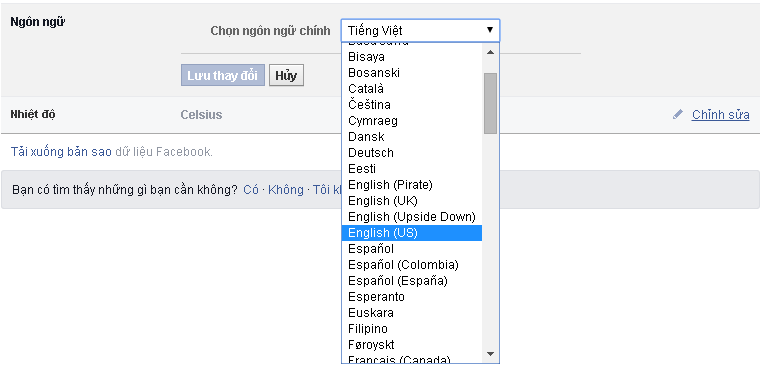
Step 3: The general settings section opens, click on the language section and switch to English.
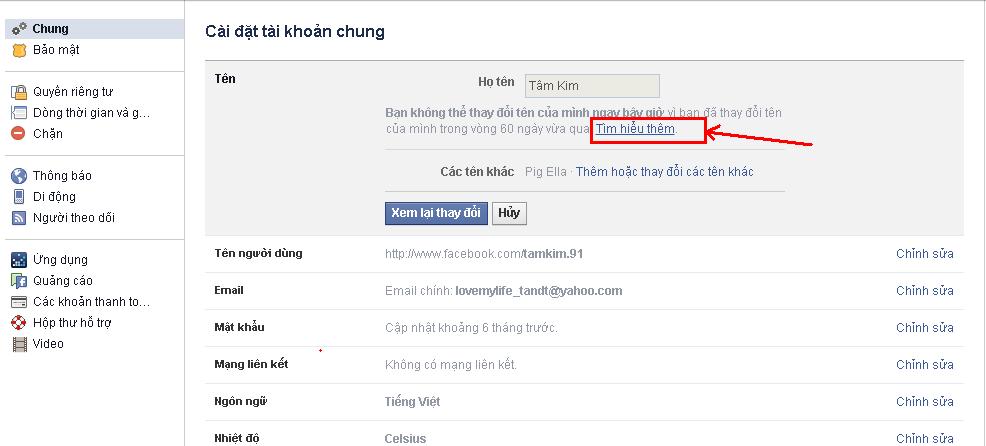
Now try to change your Facebook name to see if it works. If the message still shows that you have to wait 60 days, you can follow the 2nd method below.
Method 2: Submit personal information
If it has not been 60 days since the last name change and you still want to change your name, there is still a way for you. However, you can only change this once, so I advise you to change back to your real name.
Proceed as follows:
Step 1: In the General settings section, click edit in the Name section.
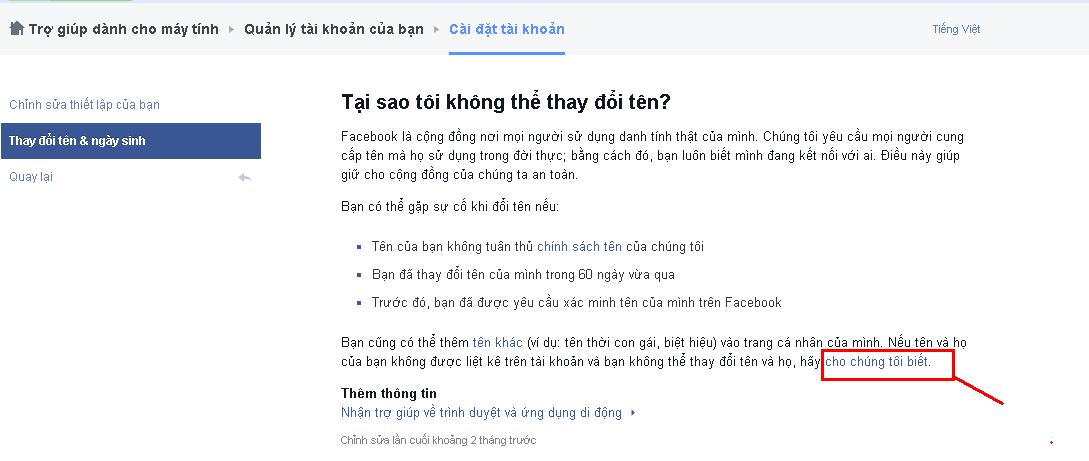
Step 2: Here, click Learn more. A new Tab appears, click let us know at the bottom of the image.
Step 3: You need to prepare a photo of the front of the ID card, clearly capture the words and numbers. Put your real name and the Reason for change section, then choose: Change legal name.
Step 4: Then, click Choose Files in the section of your ID and upload the previously prepared ID photo.
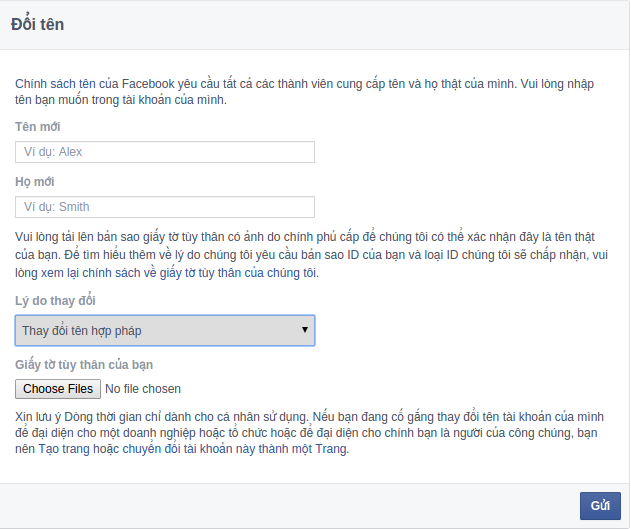
Step 5: You click Submit to send the request to Facebook and wait for the instructions to follow.
This way will have to wait for Facebook to consider. To ensure a successful change, you need to fill in the correct information: Full name, first name, middle name. Uploaded CMT photos must be sharp and clear. You can use other cards or photo identification and complete information in place of ID. Then Facebook will send you an Email and you reply in the following form:
– Hi Facebook Team.
– My New Name It Isn't Set On My Account.
– My New Name Is: “The new name you want to change”.
– And this is my ID Card: You attach your Scanned CMT.
– Thanks Facebook Team.
You wait about 2-3 days Facebook sends a confirmation email that you will have a new name without waiting 60 days for the next name change.
Currently, Facebook is having many censorship changes about changing the name when it is less than 60 days. So, with the above 2 ways, you will have success, but also you will not be able to change the name. Don't be sad, try 2-3 more times, luck will come to you.
Those of you who have changed your Facebook account name by the 2 methods above or have another more effective way, you can comment below to share it with everyone. Good luck!
The post https://meo.tips/using/instructions-for-2-ways-to-change-facebook-name-when-less-than-60-days/ appeared first on Meo.tips.
View more from Meo.tips:
Exfoliate dead skin and reduce stretch marks by mixing coffee with familiar oilsPutting the seasoning packet in first or putting the noodles in first also makes a difference
Pocket the secret to clean the refrigerator to welcome Tet in just 20 minutes
Make your own eucalyptus oil, both fragrance the room and effectively repel mosquitoes
7 indispensable skin care and protection products in summer
Does hot bath make bust worse? Tips for taking a hot shower to help protect your breasts effectively
Surprised about the very simple yet effective use of anti-dandruff treatment with lemongrass
Tips to remove the fishy smell of food in the refrigerator
The secret to renewing old fries
Instructions on how to clean makeup brushes easy to do at home
Tie your hair with a vacuum cleaner, believe it?
How to treat dry chapped lips when sitting in an air-conditioned room
Simple exercises for a dream-like body
Harm of ultraviolet (UV) rays on the eyes, skin around the eyes, how to choose protective glasses
Serious mistake using food wrap everyone makes
Summary of 5 best ASMR keyboard typing videos that make you relax the most
How to fix the phone that says charging but does not enter the battery
How to safely and properly charge the bluetooth speaker battery and use notes to help the battery last longer
What is Google drive? How to Use Google Drive's Convenient Free Features That You Didn't Know
How to use the most effective cooling fan in the hot season


Comments
Post a Comment